
Key Takeaways
JAM sessions (Joint Application Modeling) are collaborative workshops that gather software requirements early using prototyping and visualization.
JAD sessions (Joint Application Design) originated in the 1970s and focus on gaining early user consensus during design.
JAM sessions evolved from JAD and add human-centered design, rapid prototyping, and agile-compatible techniques.
Both methods reduce costly rework by aligning teams before development begins.
Use JAM sessions when you need to clarify requirements, reduce ambiguity, and center the user experience from day one.
"Intelligence isn't expecting people to understand what your intent is; it's anticipating how it will be perceived."
– Shannon L. Alder
What Is a JAM Session?
A JAM session — short for Joint Application Modeling — is a structured, collaborative workshop. Teams use it to gather and model software requirements early in the development process. The goal is to build a shared, user-centered vision before a single line of code is written.
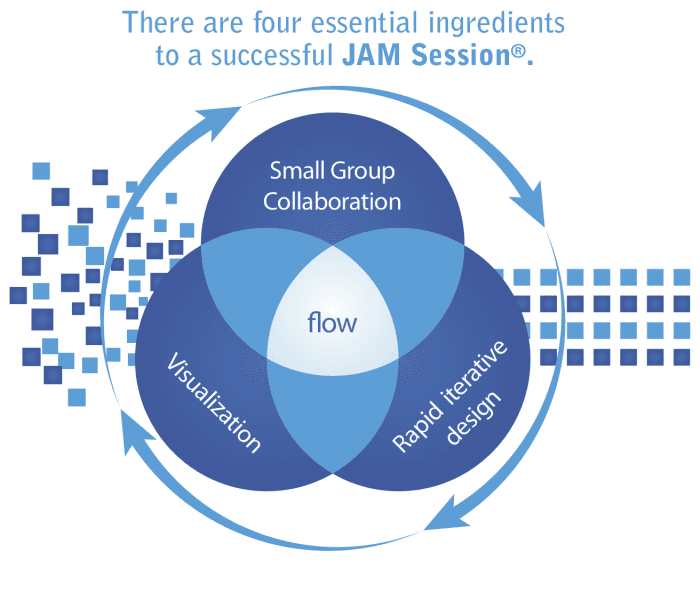
JAM sessions use human-centered design principles, visualization techniques, and rapid prototyping. These tools make requirements concrete and easy for everyone to understand — developers, stakeholders, and end users alike.
What Is a JAD Session?
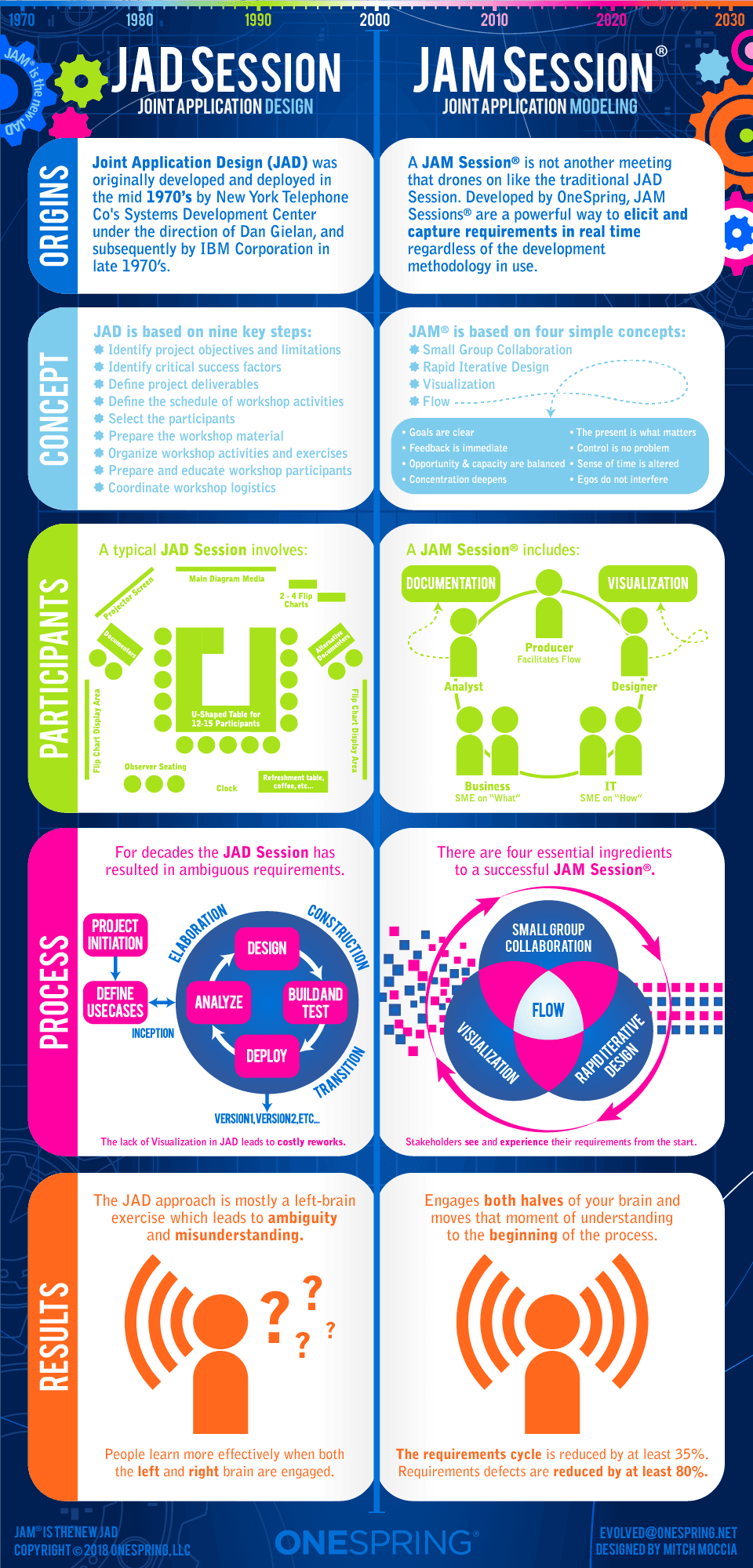
JAD stands for Joint Application Design. It was developed in the 1970s as a way to bring customers and users into the software development process early. The primary goal of a JAD session is to reach consensus on design decisions before development begins.
JAD sessions typically involve structured meetings with a trained facilitator, business stakeholders, and technical team members. They produce documented requirements and design agreements that guide the development team forward.
JAM vs. JAD: What's the Difference?
If you're familiar with JAD sessions, you'll notice some overlap with JAM. Both methods aim to align teams before development starts. Both involve collaboration between users and builders. And both reduce the risk of building the wrong thing.
The key differences come down to approach and era. JAD is older and more documentation-focused. JAM is more visual and iterative. JAM sessions incorporate rapid prototyping, allowing teams to react to something tangible — not just written specs. JAM is also designed to work alongside modern methodologies like Agile and Lean.
Why JAM Sessions Reduce Costly Rework
Imagine this: after months of planning and development, your product launches — and users don't respond the way you expected. Features that seemed obvious to the team fall flat with real users. You're back to square one.
This is the rework problem. It's expensive, demoralizing, and common. JAM sessions address it head-on by front-loading alignment. When your team agrees on requirements before development begins, you build the right thing the first time.
Reducing ambiguity upfront has a direct impact on cost and time-to-market. Less confusion means fewer revision cycles and faster delivery.
How JAM Sessions Work at OneSpring
OneSpring developed JAM sessions to address a recurring challenge: teams building products users didn't actually want. Our JAM sessions bring your team together in a structured, facilitated environment to surface real requirements through collaboration and visualization.
Here's what a typical JAM session includes:
A trained facilitator to guide the conversation and keep it productive
Business stakeholders, UX designers, and technical leads in the same room
Rapid prototyping tools to make ideas tangible and testable
Visualization techniques that clarify complex requirements
Documented outcomes that align the team before development begins
JAM Sessions and Agile: A Natural Fit
JAM sessions have evolved alongside modern development methodologies. While the core process has remained consistent, the tools and techniques we use have kept pace with Agile and Lean practices.
In an Agile context, JAM sessions work well at the start of a sprint or a new feature cycle. They help product owners and developers reach shared understanding quickly — which is exactly what Agile demands. Less time debating requirements, more time building.
Frequently Asked Questions
What does JAM stand for in a JAM session?
JAM stands for Joint Application Modeling. The name reflects the collaborative, hands-on nature of the process. "Joint" means multiple stakeholders are involved. "Application" refers to the software being designed. "Modeling" highlights the use of prototypes and visuals to make requirements concrete rather than abstract.
What does JAD stand for in software development?
JAD stands for Joint Application Design. It was created by IBM in the late 1970s as a structured workshop method to gather software requirements with user participation. JAD sessions involve a facilitator, end users, and technical staff working together to produce agreed-upon design documentation before development begins.
How long does a JAM session typically take?
JAM session length varies based on project scope and complexity. A focused session for a single feature or user flow may take a half day. For larger, more complex products, a JAM engagement might span multiple sessions over one to two weeks. The goal is always to reach alignment efficiently — not to run the clock.
Who should be in a JAM session?
The right participants depend on the project, but JAM sessions typically include: a trained facilitator, business stakeholders who own the requirements, UX designers who will act on them, and technical leads who need to understand feasibility. End users or user proxies can also participate when direct feedback is needed. Keeping the group focused and decision-capable is key.
When should you use a JAM session vs. a JAD session?
Use a JAD session when your primary goal is consensus on design requirements with a more structured, documentation-driven output. Use a JAM session when you need that same alignment but want to incorporate rapid prototyping, visual modeling, and modern agile-compatible techniques. JAM sessions are generally a better fit for teams using iterative development methods.
Can JAM sessions be run remotely?
Yes. JAM sessions can be run effectively in remote or hybrid formats using collaborative tools like Figma, Miro, or similar whiteboarding platforms. The facilitator's role becomes even more important in remote settings — keeping participants engaged, managing the conversation, and ensuring decisions are captured clearly. The outcomes are comparable to in-person sessions when facilitated well.
How do JAM sessions improve ROI on software projects?
JAM sessions reduce the most expensive kind of rework: rebuilding features that didn't meet user needs. By investing time in alignment before development starts, teams avoid mid-project pivots, scope creep from misunderstood requirements, and post-launch redesigns. The upfront cost of a JAM session is typically a fraction of the cost of fixing problems discovered after launch.